JeffBet Deposit Data: Tested Methods, Steps & Common Issues
We have carried out a JeffBet deposit test, creating a new JeffBet account, depositing our own money and using our personal Visa debit card to do so.
Below, we will guide you through all things JeffBet and beyond. We'll look at the step-by-step deposit process, analyse the various payment methods offered and, finally, we will provide guidance on how to navigate some common deposit challenges.
 JeffBet Payment Methods


- +-
JeffBet Deposit Methods Compared
We chose to use a Visa debit card to conduct our JeffBet deposit test. We could have opted for a different payment option quite easily though, with a host of payment methods offered.
A lot of brands that offer multiple payment methods take a fairly standard approach to minimum and maximum deposits. JeffBet do not. As such, we have listed all the available options below, capturing their various minimum and maximum deposits:
| Payment Methods | Min Deposit | Max Deposit | Fees | Deposit Time | Triggers Bonus |
|---|---|---|---|---|---|
 Visa | £10 | £2,500 | No fee | Instant | |
 Mastercard | £10 | £2,500 | No fee | Instant | |
 Skrill | £20 | £2,500 | No fee | Instant | |
 Neteller | £20 | £2,500 | No fee | Instant | |
 PayPal | £10 | £2,500 | No fee | Instant | |
 Pay By Mobile | £10 | £40 | Call rate | Instant | |
 Neosurf | £15 | £2,500 | No fee | Instant | |
 Payz | £20 | £2,500 | No fee | Instant | |
 PaysafeCard | £10 | £700 | No fee | Instant | |
 Apple Pay | £10 | Not specified | No fee | Instant |
Our Real Money Deposit Test with Visa

One of the standout things we highlight in our JeffBet review is the huge array of payment options that are available to bettors. As a part of our testing, we also confirmed how long Jeffbet takes to process withdrawals and got good results; our test withdrawal arrived in just 47 minutes.
Regardless of your chosen payment method, if you want to get started with JeffBet, we can help you on your way.
JeffBet Deposit Process
The JeffBet deposit process isn't exactly complicated, but we've captured a step-by-step process for you to follow:
-
Hit "Cashier"
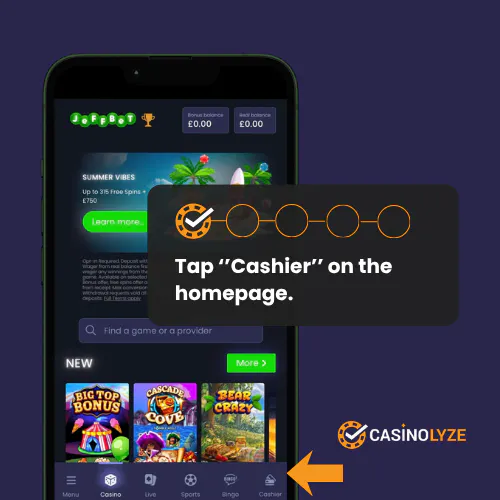
Once logged into your JeffBet account, click on the "Cashier" button in the bottom right corner.
-
Choose Your Payment Method
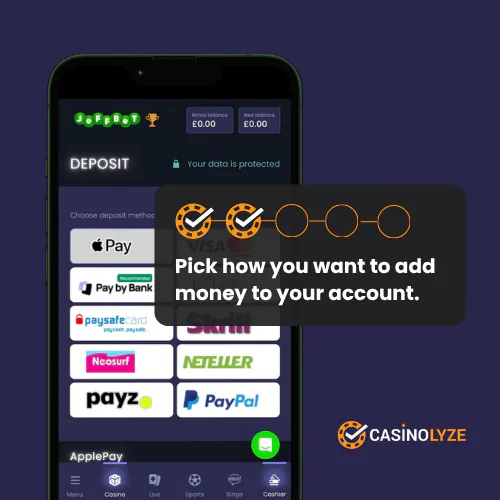
From the icon buttons provided, click on your preferred payment method.
-
Enter Your Deposit Amount & Payment Details
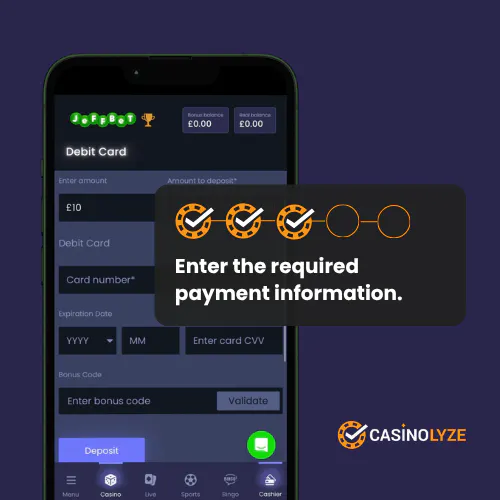
Enter your amount in the box in the top left corner. This can be typed in manually or populated using one of the four quick-reference options.
Beneath that, enter your relevant payment details.
-
"Protection of Customer Funds"
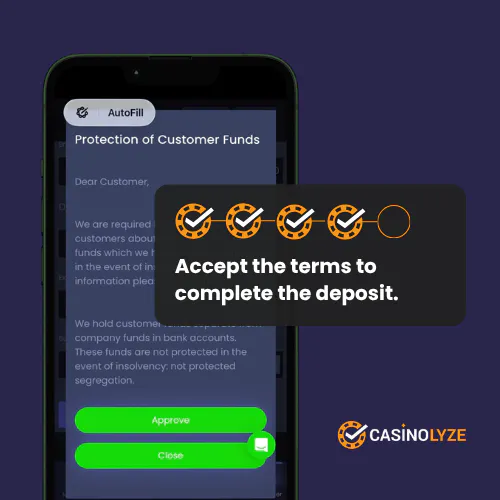
You will now see a pop-up titled "Protection of Customer Funds". Providing you agree to the terms, click "Approve".
-
Return to the Game Lobby
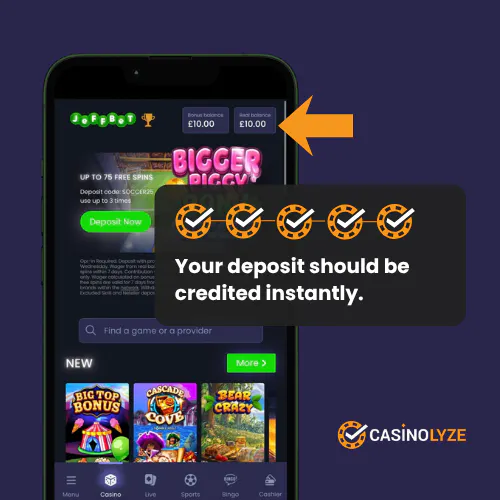
During our JeffBet deposit process, we did not get a "Confirmation" page. Instead, returning to the game lobby shows you your account balance.
This can be seen in the top right corner, which you can take as confirmation your deposit has been processed successfully.
JeffBet Deposit Issues
We did not experience any deposit issues during our JeffBet deposit test, although the lack of a confirmation page and a few second delay on our account balance did have us fearing the worst.
Thankfully, we didn't actually encounter a problem. Problems do occur, though. We've captured the most common issues below:
-
Lost Deposits
For a few seconds, we thought we'd experienced a lost deposit during our JeffBet deposit test. We hadn't but it's still worth detailing exactly what a lost deposit is - and, importantly, how it is resolved.
If a lost deposit occurs, you will see the funds leave your bank account but that money then doesn't arrive where it was supposed to. Instead, it disappears into the ether.
Thankfully, even if you do have the misfortune of experiencing such an issue, it is easily solved. You will be able to provide evidence of the funds leaving your payment method. With this, the JeffBet customer service team will be able to confirm a lost deposit has indeed occurred and, generally, will issue a refund within 24 hours.
-
Rejected Payments
A rejected payment is where you have attempted to make a deposit but it has been rejected, or blocked.
Depending on the reason, these rejections can be triggered by the casino itself or your bank.
If it is the latter then the rejection reason is typically due to insufficient funds. This is resolved by adding more funds to your chosen payment method or, if preferred, changing payment method entirely.
Where the casino blocks a deposit, it will usually be due to a breach of an agreed deposit limit. The casino has no choice but to initiate this rejection, due to their licensing conditions.
You do have the option of changing your deposit thresholds but this can take time (24 hours) and, remember, just because you can, it doesn't mean you should. Always remember why you configured a deposit limit in the first place.

Ash is a seasoned writer specialising in the UK's online gambling market. With a background in data analytics and hands-on knowledge of the gambling industry, he offers practical insights into online casinos in the UK.