Gala Spins Deposit Data: Tested Methods, Steps & Common Issues
Looking for more information about Gala Spins’ deposit methods, limits, and fees? Our team has put together this detailed guide to help answer common questions and give you a quick overview of the available payment methods so you can decide which one to use.
 Gala Spins Payment Methods


Gala Spins Deposit Methods Compared
Gala Spins offers several casino payment methods that are popular among UK players, and it is one of the online casinos that allows a low £5 minimum deposit for most of these options. You can deposit using debit cards, Apple Pay, and Google Pay, as well as more traditional methods such as Instant Bank Transfer.
For e-wallet users, PayPal is available, although it has a slightly higher minimum deposit of £10. There is also an option to make prepaid deposits using Paysafecard.
The maximum deposit for all methods is £2,000, there are no fees, and deposits are transferred instantly. See the full breakdown below.
| Payment Methods | Min Deposit | Max Deposit | Fees | Deposit Time | Triggers Bonus |
|---|---|---|---|---|---|
 Visa | £5 | £2,000 | No fee | Instant | |
 Mastercard | £5 | £2,000 | No fee | Instant | |
 Apple Pay | £5 | £2,000 | No fee | Instant | |
 Google Pay | £5 | £2,000 | No fee | Instant | |
 Revolut Cards | £5 | £2,000 | No fee | Instant | |
 PayPal | £10 | £2,000 | No fee | Instant | |
 PaysafeCard | £5 | £2,000 | No fee | Instant | |
 Instant Bank Transfer | £5 | £2,000 | No fee | Instant |
Gala Spins Deposit Process
As mentioned earlier, we tested Gala Spins with real money and tracked each step of the deposit process. Below, you can see how the deposit works when using Visa. However, the process is nearly the same regardless of which payment method you choose.
-
Locate the Wallet
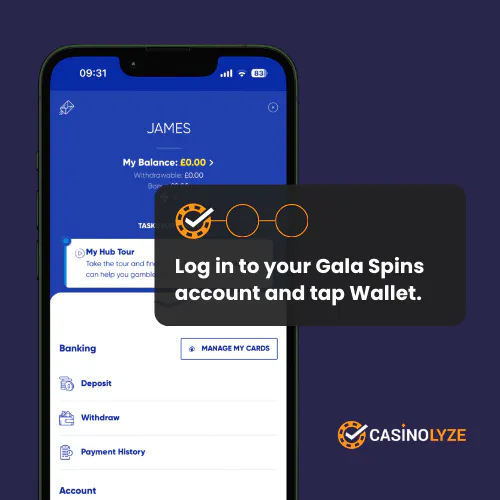
If you’re new, you can register a Gala Spins account or log in using your existing details. After that, go to your wallet and select “Deposit” in the Banking section.
-
Start the Process
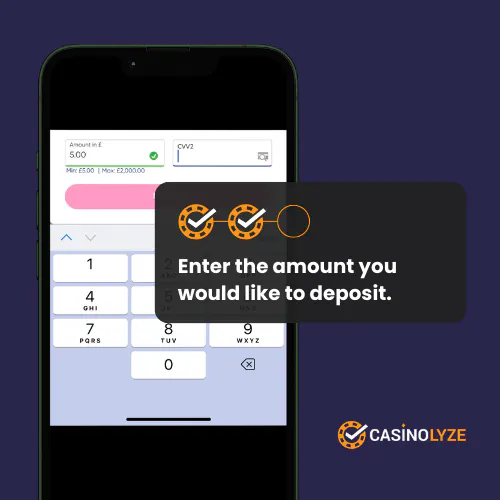
Once you click the “Deposit” button, Gala Spins will redirect you to the deposit page. There, you can choose your payment method, enter the deposit amount, and follow the instructions to complete your real-money deposit.
-
Deposit Completed
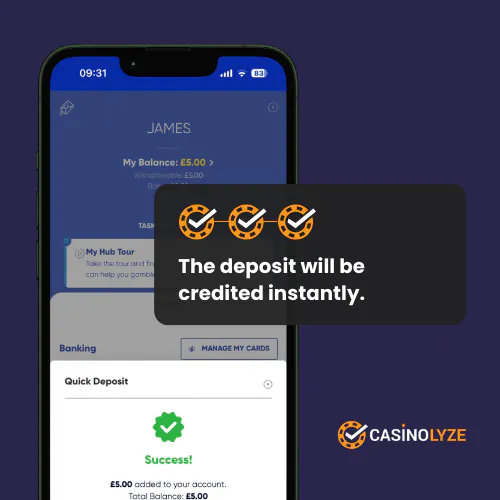
After following the on-screen instructions, confirm the deposit. The money should then be transferred instantly from your bank account (or the payment method you chose) to your Gala Spins account. After that, you can start playing.
Deposit Offers at Gala Spins
If you're looking for the welcome offer available at Gala Spins, here is the current promotion for new players.
| Operator | Welcome Offer | Bonus Code | Get Bonus | |
|---|---|---|---|---|
 | Casino Offer Bet £10 Get £20 Casino Bonus + 100 Free Spins for Selected Slots | No code required | Get Bonus | 18+. New customers only. Deposit & Spend £10 on selected slots within 7 days of acc. regist. to get a £20 Casino Bonus (max stake £2, valid 7 days, 10x wag) and 100 Free Spins (£0.10 each, valid on selected games, claim within 7 days, valid 7 days). Restrictions & T&Cs apply. |
Gala Spins Deposit Issues & Solutions
If you’re experiencing issues with your Gala Spins deposit, check the common problems and solutions listed below. If your issue is related to withdrawals, visit our Gala Spins withdrawal guide for more detailed information.
-
Unable to use a new payment method
Gala Spins allows a maximum of three active payment methods within a rolling 30-day period. If you have already used three different debit cards or e-wallets during that time, the casino may block additional payment methods.
Wait until the 30-day period resets or continue using one of the payment methods already linked to your account. If you believe the restriction is affecting your account incorrectly, contact Gala Spins customer support for assistance.
-
Technical error when making a deposit
You may see a message saying “a technical error has occurred” when trying to make a deposit. This can happen due to a temporary system issue or a payment processing problem.
Wait a moment and try the deposit again. If the issue continues, contact Gala Spins customer support and provide your account details and the exact error message so they can investigate the problem.
-
Deposit Missing
In rare cases, a deposit may get stuck between your bank and the casino. If your deposit is delayed, try refreshing your Gala Spins account by logging out and then logging back in. Wait at least 15 minutes and check your bank account to see whether the money has actually been charged.
If it has, take a screenshot of the transaction details and send it to Gala Spins customer support so they can investigate the issue further.
Learn More About GalaSpins
Read our Gala Spins review


James is a former professional darts player who tests and reviews online casinos for Casinolyze. Drawing on his experience in competitive sports, he provides fair and detailed insights into gameplay, bonuses, and payout performance.