Magical Vegas Deposit Data: Tested Methods, Steps & Common Issues
We have carried out a Magical Vegas deposit test using a Visa debit card and £10 of real money.
As you read on, we detail the full Magical Vegas deposit process, discuss the available banking options and look at some of the issues that casino bettors can encounter when depositing funds.
 Magical Vegas Payment Methods


Magical Vegas Deposit Methods Compared
There are a decent range of payment methods available at Magical Vegas, with Apple Pay, Instant Bank Transfer, PayPal, PaySafeCard and debit card all available choices.
Our test was conducted with the latter, specifically using a Visa debit card; Mastercard is also accepted by Magical Vegas.
The minimum deposit amount offered is a passable £10, whilst there is no fee associated and processing is instant. Another positive of the overall banking processes at Magical Vegas can be found with our withdrawal test; our funds were processed in just a few hours.
| Payment Methods | Min Deposit | Max Deposit | Fees | Deposit Time | Triggers Bonus |
|---|---|---|---|---|---|
 Visa | £10 | £10,000 | No fee | Instant | |
 Mastercard | £10 | £10,000 | No fee | Instant | |
 PayPal | £10 | £10,000 | No fee | Instant | |
 Trustly | £10 | Not specified | No fee | Instant | |
 PaysafeCard | £10 | Not specified | No fee | Instant | |
 Apple Pay | £10 | £10,000 | No fee | Instant | |
 Instant Bank Transfer | £10 | Not specified | No fee | Instant |
Our Real Money Deposit Test with Visa

Our in-depth review of Magical Vegas scored the platform 2.57 out of 5.00, with the game library and collection of available payment methods amongst the pros we highlight.
With that in mind, and the findings of our withdrawal test, you may well be inclined to give it a go. Doing so is easy.
Magical Vegas Deposit Process
If you have never deposited funds at Magical Vegas, then fear not. Our step-by-step deposit guide has you covered:
-
Hit "Deposit"
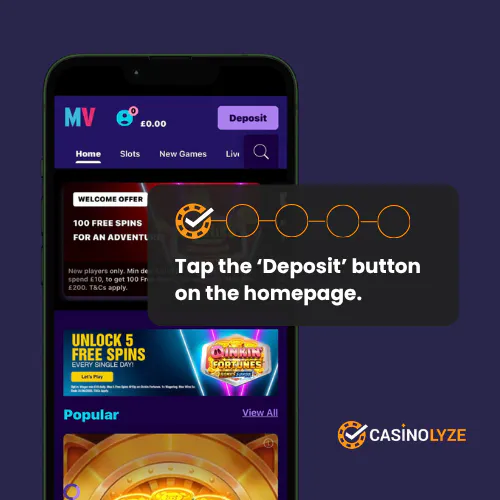
After logging into your Magical Vegas account, click on the purple deposit button in the site header.
-
Choose Your Payment Method
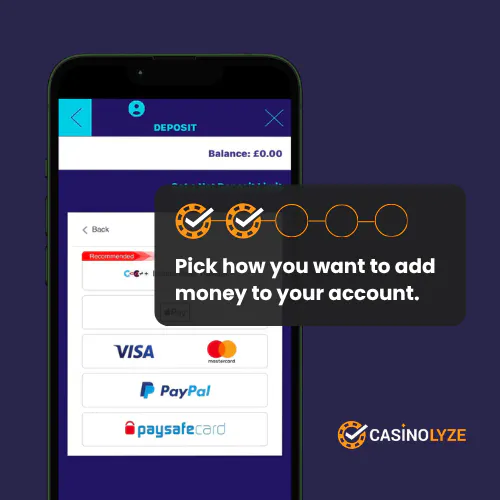
You will be presented with a list of deposit methods. Choose your preferred payment option by clicking on it.
-
Enter Your Payment Details
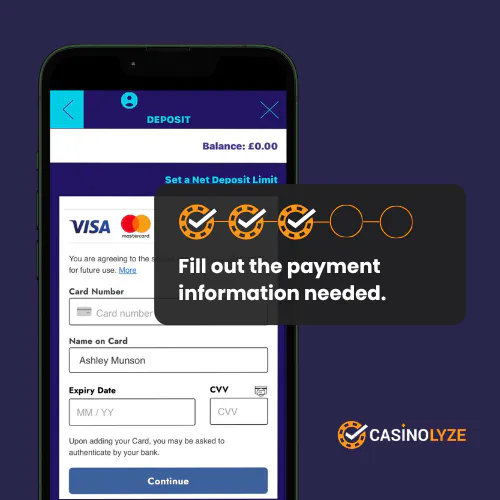
You will now see a screen asking you to enter your relevant payment details. Do so and then hit "Continue".
-
Choose Your Deposit Amount
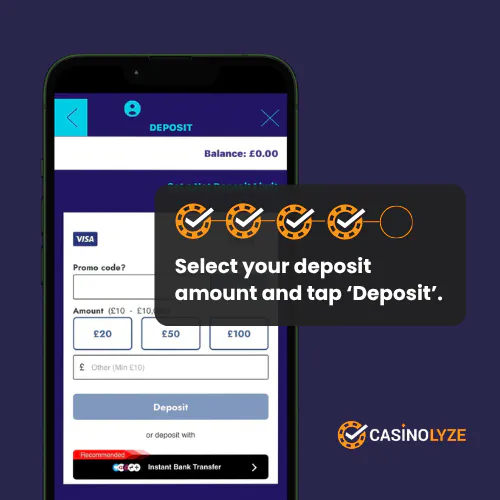
You will now be able to input your desired deposit amount, which can be typed directly into the "£" box or filled using one of the quick reference payment buttons that are above it.
Hit "Deposit".
-
Deposit Successful
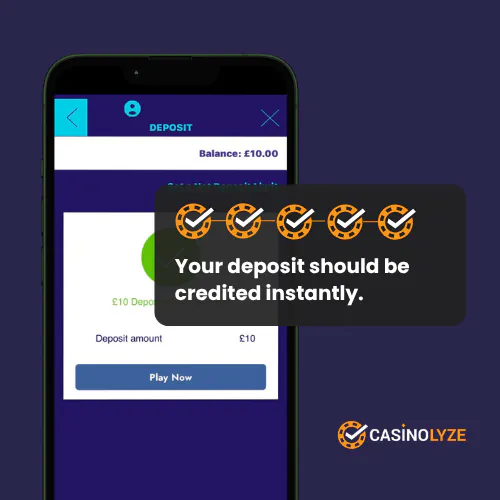
Finally, you will see a confirmation that your deposit has been successful.
Magical Vegas Deposit Issues
We have to be clear that our Magical Vegas deposit test was conducted without any fault, however, we know that won't always be the case.
Below, we highlight a couple of the more common - but still uncommon - deposit issues you may encounter.
-
Lost Deposits
If you've ever seen funds leave your bank account and then not arrive at their destination then what you have experienced is a lost payment. In the casino world, this is a lost deposit - and it can impact every bookmaker on the planet, not just Magical Vegas.
Whilst frustrating, it's also easily fixed. Simply reach out to the Magical Vegas customer support team, show evidence of the funds leaving your bank and you can then expect a full refund within circa 24 hours.
-
Rejected Payments
A rejected payment is a deposit that looks to have processed, only to fail a short while afterwards. Unlike a lost deposit, the funds never leave your bank account.
Generally, this occurs due to insufficient funds at source or due to the attempted deposit causing a breach of agreed deposit limits.
To resolve the issue, you can add more funds to your relevant payment method, change the method entirely or apply an adjustment to your deposit limits.
If none of the above resolves your issue, contact the Magical Vegas customer services.
Explore More
Read our Magical Vegas review


Ash is a seasoned writer specialising in the UK's online gambling market. With a background in data analytics and hands-on knowledge of the gambling industry, he offers practical insights into online casinos in the UK.