PlayOJO Withdrawal Time: 22 Minutes (Tested with Visa)
Our team has tested PlayOJO withdrawal times via multiple methods, and our Visa withdrawal test was paid out in 22 minutes. In this guide, you will find all withdrawal times, fees, limits and possible issues and how to navigate them.
PlayOJO Withdrawal Test Results


PlayOJO Withdrawal Time by Method
Below, you will find a breakdown of all withdrawal times at PlayOJO. In this table, you will also find the minimum and maximum limits for each method. There are many popular payment methods available including debit cards, instant banking and PayPal.
PlayOJO is also one of the rare online casinos that offer only £1 minimum withdrawal (except for PayPal).
| Payment Methods | Min Withdrawal | Max Withdrawal | Fees | Withdrawal Time |
|---|---|---|---|---|
 Visa | £1 | Not specified | No fee | 1-3 business days |
 Mastercard | £1 | Not specified | No fee | 1-3 business days |
 PayPal | £20 | £5,000 | No fee | Within a few hours |
 Instant Bank Transfer | £1 | Not specified | No fee | Within a few minutes |
 Trustly | £1 | Not specified | No fee | Instant |
 Apple Pay | £1 | £50,000 | No fee | 1-3 business days |
PlayOJO Withdrawal Time Test Logs
These are all PlayOJO withdrawal tests currently in our database, with real results and timeline data.
- 22 minutesWithdrawal TimeVisaMethod
 Withdrawal Timeline
Before I was able to deposit, I was asked to provide information about my employment and salary and verify my mobile phone number. At PlayOJO, there was no minimum withdrawal amount. I requested the withdrawal at 9:46 am on 29/01/2026.

When I proceeded with the withdrawal, I was asked to provide additional banking details, including my bank, account number, and IBAN. The funds were received at 10:08 am on 29/01/2026, so the total withdrawal time was 22 minutes.

- 2 hours and 14 minutesWithdrawal TimeApple PayMethod
 Withdrawal Timeline
I requested a £10 withdrawal from PlayOJO at 9:53. The withdrawal was moved into the processing queue shortly after. The card linked to my Apple Pay is a Visa debit card, and my bank is Barclays Bank.

The withdrawal arrived in my bank account 2 hours and 14 minutes later, at exactly 12:07.

- 5 hours and 59 minutesWithdrawal TimeTrustlyMethod Withdrawal Timeline
I requested my withdrawal to Trustly at 07:57 on August 14.

Just under six hours after requesting my withdrawal, my funds arrived back in my bank account.


Our Real Payout Test Experience

Although the Visa withdrawal was processed quickly in our test (22 minutes), the overall experience in the app felt unnecessarily complicated. The interface was difficult to navigate during the deposit process, and it also took some time to locate and start the withdrawal process.
During the payout request, we were also asked to provide additional banking details, such as our bank name and IBAN. While these checks are likely part of anti-money laundering requirements, they can make the withdrawal process feel longer and less user-friendly than expected.
PlayOJO Visa Withdrawal Times vs Other Casino Tests
We have carried out Visa withdrawal tests at many online casinos. Here you can compare PlayOJO's Visa withdrawal time with the other casinos we have tested.


How Withdrawals Work at PlayOJO
The process to withdraw from PlayOJO is a simple 4-step process that we explain thoroughly below.
-
Access Your Account
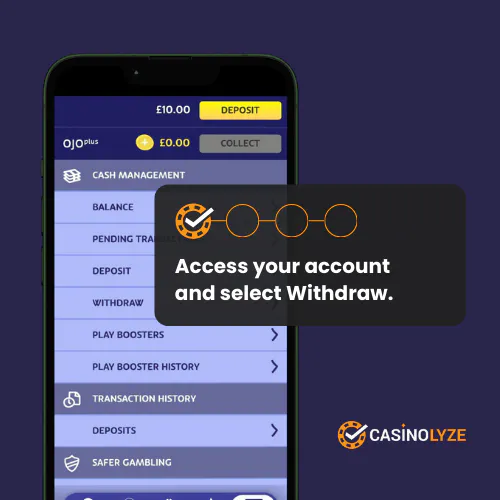
Go to your account and choose Withdraw from the menu.
-
Start The Withdrawal Process
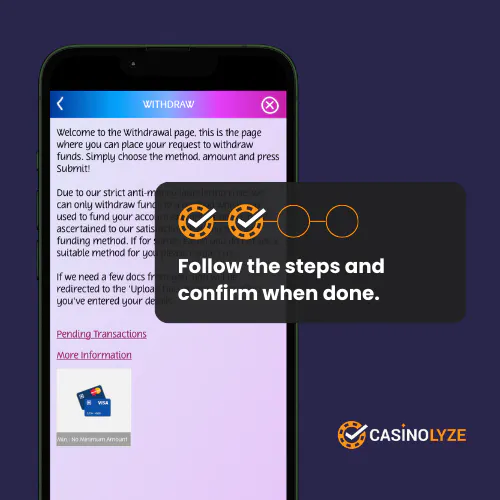
Follow the exact guidance at PlayOJO Withdraw page. Make sure all the details are correct.
-
"Success" Confirmation Page
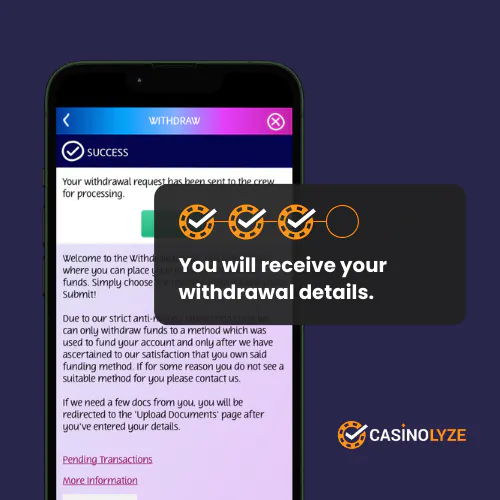
When all the steps are done, you should see a confirmation page that your withdrawal was successful.
-
Check your bank account
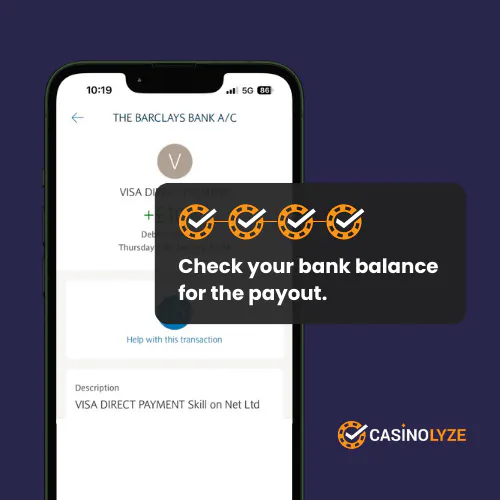
The last step is to open your bank account app or website and check that you have received the balance to your account correctly.
Common PlayOJO Withdrawal Issues
Check these common issues and the solutions before withdrawing from PlayOJO.
-
Withdrawal Not Available
To be able to withdraw from PlayOJO, you need to make sure you don't have any ongoing game sessions or active bonuses. You can check this from your account at "Cashier" and navigate to the "Active Bonuses" section.
-
Delay in PlayOJO Withdrawal
To avoid long delays, we recommend uploading your ID document, your registered address and verifying the ownership of your chosen payment methods. This usually makes the process a bit faster.
PlayOJO aims to process withdrawals within a few hours, but there is no maximum time frame stated in the terms and conditions. If you need to wait more than 5 days, contact PlayOJO customer service to make sure there is not additional details needed.
How Long Did Your PlayOJO Payout Take?
Have you withdrawn from PlayOJO? Let us know how long your payout took. Player reports help us maintain reliable withdrawal time results and improve the accuracy of our casino reviews. You can also share your full experience by leaving a review on our PlayOJO Casino page.
FAQs
What could delay my withdrawal at PlayOJO?
Why did I receive the payout via different payment method?


James is a former professional darts player who tests and reviews online casinos for Casinolyze. Drawing on his experience in competitive sports, he provides fair and detailed insights into gameplay, bonuses, and payout performance.